

Good Wi-Fi is Designed, Not Installed
When wireless disappoints, the reflex is almost always to buy something: more access points, a faster wireless standard, or more internet bandwidth. It feels like the obvious fix, and it’s usually the wrong one. In most environments we assess, the network already has more capability than anyone is getting out of it. The problem was designed in, not installed in, and no amount of new hardware corrects a failed design.
Part of the reason people impulsively add more to the wireless network when it’s not working properly is that most people’s mental model of Wi-Fi comes from their home use. At home, there are just a few access points, sheetrock walls Wi-Fi can easily travel through, and a handful of devices.
But an office is a much less forgiving environment: more users, more devices, more demanding applications, and building materials that treat radio waves very differently than drywall does. Home Wi-Fi is a low-stakes problem. Enterprise Wi-Fi is an engineering one, and it tends to fail in three predictable ways.
“When the Wi-Fi disappoints, the instinct is to buy something. The fix is almost never a purchase.”
— Promenet Senior Engineer, Wireless/Networking
3 Ways Enterprise Networks Fail
1. It starts with hardware instead of requirements.
The most common mistake happens before anything is mounted. Design usually begins with “how many access points do we need?” or “what’s the best Wi-Fi 7 access point?” Those feel like practical questions. They’re the wrong place to start.
A sound design works top-down, from the business before the hardware. It starts with questions, such as:
- What applications will run on the wireless — voice and video calls, point-of-sale, scanners, medical devices, guest internet?
- How many users and devices, and what’s the mix of laptops, phones, IoT, and older gear that only speaks the slower legacy protocols?
- What does the business actually lose when wireless goes down for an hour?
Only after those answers do access-point counts and models mean anything, because no two access points are the same, and the right one depends entirely on what it has to serve.
The physical environment matters just as much. Concrete, glass, structural steel, elevator shafts, and stairwells all shape where a signal goes. Even exposed ductwork matters. Thin aluminum reflects radio frequency almost like a mirror, so an access point you assumed was blanketing a room can be firing signal up into the ceiling and out into the walls instead of down to the people below. This is why a real design includes a walkthrough, not just a drawing. You have to see the space to know how it behaves. You can’t rely on the floor plan alone.
2. It is designed for coverage when the problem is capacity.
Say the requirements are sorted and every corner shows a strong signal. That still isn’t a finished design, because coverage and capacity are different problems.
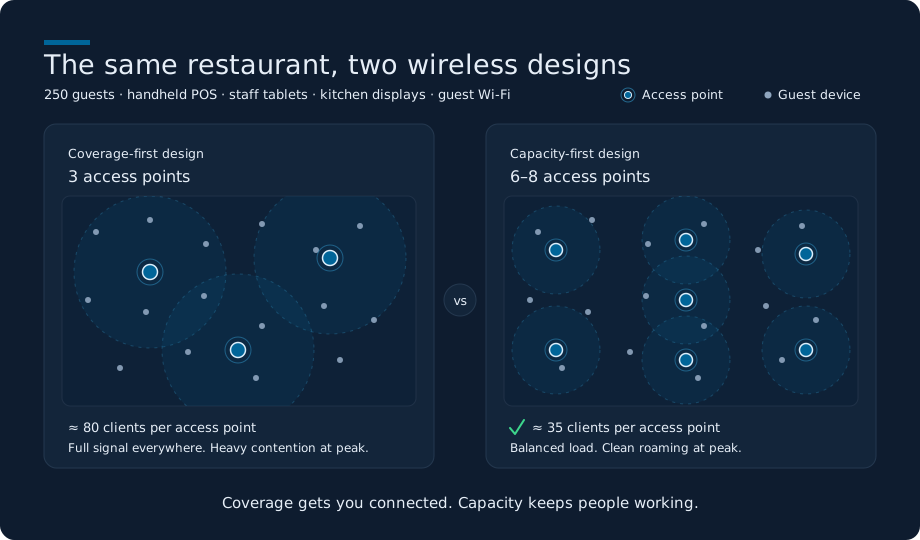
Consider a restaurant with 250 guests at peak, plus handheld point-of-sale devices, staff tablets, kitchen displays, and guest Wi-Fi. A coverage-first design might use three access points, because three is enough for the signal to reach everywhere. A capacity-first design for the same space could need six to eight — not to cover more floor, but so each radio serves a manageable number of clients, keeps them from fighting over the same airtime, and lets devices roam cleanly during the dinner rush. It’s the same building and the same signal map; the difference only shows up when the room is full. Coverage tells you a device can reach the network. Whether the network can serve everyone using it at once is a capacity question, and capacity, not signal strength, usually decides how many access points a modern space really needs.
3. It gets installed and forgotten.
The third failure comes after the gear is on the wall. Modern platforms are marketed as zero-touch and AI-driven, which makes it sound like you can rack the access points, power them up, and walk away. Getting wireless running and getting it tuned are not the same thing.
Tuning is where transmit power, channel widths, minimum data rates, and roaming behavior get set for the space. Skip it, and you get the classic symptoms: full signal bars and a video call that keeps dropping, devices stuck on the wrong access point, whole areas that feel slow for no obvious reason. Automatic optimization helps, but it isn’t a substitute for judgment. Left unbounded, it can make poor calls, like powering one access point down to nothing while cranking its neighbor to maximum. Radio frequency isn’t static either. It shifts week to week with interference from neighboring networks and equipment, which is why a network that was tuned well two years ago drifts as the environment around it changes.
Underneath all of this is an ownership gap. Most organizations have a network person, a firewall person, and a server person. Very few have anyone who owns RF specifically, so the wireless runs on set-and-forget while everyone assumes it’s someone else’s job.
Avoid failure by knowing what’s connected
If there’s a single thing worth doing before the next hardware purchase, it isn’t a purchase at all. It’s knowing what’s connected to your network.
Most IT leaders can tell you their server utilization, their storage consumption, and their firewall uptime to the decimal. Far fewer can tell you which access points are overloaded, where roaming is failing, which channels are congested, or how many unmanaged devices are connected, let alone identify at a glance which clients are corporate, which are guest, and which are IoT. That inventory changes constantly. People bring in new phones and laptops, a school takes delivery of a fleet of Chromebooks, and more devices show up capable of the newer 6 GHz band than the current access points can even use. Without a current picture, every wireless decision is a guess.
The practical version is a baseline: a week of real operational data — airtime and channel utilization, retry rates, roaming success, and how clients are distributed across access points — paired with a walkthrough, then revisited quarterly because the picture keeps moving. More often than not, that exercise turns a vague “the Wi-Fi is slow” into a short list of specific, fixable problems, and shows that the network already in place has more room than anyone assumed.
Good Wi-Fi is designed, not installed. It starts from what the business needs, gets tuned to the space it lives in, and is measured often enough to stay honest. A site survey or assessment will tell you which of these three problems you’re dealing with, well before you need to spend anything on new equipment.
Start with a clear picture.
Before your next wireless purchase, get a clear picture of what your network is doing today. Promenet’s engineers run a full site survey that maps coverage, capacity, interference, and a complete device inventory. Then, we walk you through what it means for your environment.

About Promenet
Promenet is a New York–based managed services provider built around engineering depth: 27 years in business, 36+ certifications, and hands-on expertise across managed IT, integration, and cybersecurity. We work as a technical partner rather than a vendor, leading with education and honest assessment to ensure we deliver the best solution for your environment. We support organizations across private education, financial services, legal, nonprofit, real estate, and gaming and casinos.
Promenet Inc. · 42 Broadway, 16th Floor · New York, NY 10004 · (212) 968-0190 · promenet.com


